
Check out our White Paper Series!
A complete library of helpful advice and survival guides for every aspect of system monitoring and control.
1-800-693-0351
Have a specific question? Ask our team of expert engineers and get a specific answer!
Sign up for the next DPS Factory Training!

Whether you're new to our equipment or you've used it for years, DPS factory training is the best way to get more from your monitoring.
Reserve Your Seat Today
Central Arizona Project (CAP) needed a single, operator-friendly way to monitor and control widely distributed infrastructure across a 336-mile water delivery system. By deploying a T/Mon LNX master station and NetGuardian RTUs, CAP consolidated alarms, improved remote visibility of critical facility conditions, and reduced the need for on-site visits.
| Industry | Water utility |
|---|---|
| Organization | Central Arizona Project (CAP) |
| Geography and Coverage | Arizona - 336-mile system of aqueducts, tunnels, pumping plants, and pipelines |
| Service Scale | Delivers 1.5 million acre-feet of Colorado River water to Central and Southern Arizona annually, serving more than 5 million people |
| Primary Challenge | Transition from a legacy monitoring approach to a modern, centralized system for remote visibility and control |
| Solution Deployed | T/Mon LNX polling NetGuardian RTUs to bring facility and network alarms into one master view |
| Key Result | "Now it's the primary system" - improved situational awareness and reduced manual effort for maintenance and response |
| Products Used | T/Mon LNX master station; NetGuardian 832A RTUs |
Central Arizona Project is Arizona's single largest resource for renewable water supplies. CAP brings Colorado River water to Central and Southern Arizona every year, supporting more than 5 million people. Operating at that scale requires dependable communications and monitoring across geographically dispersed infrastructure.
CAP needed reliable, centralized monitoring for a large number of remote sites where operators cannot keep "eyes on every piece of equipment" at all times. As Sean Parsons, Communications Engineer at CAP, put it: "You can't have eyes on every piece of equipment, everywhere in the network, all at once without some kind of system to monitor those devices."
Like many utilities, CAP also had an older monitoring system that still worked at a basic level, but was no longer adequate as a primary solution.
"We have an older system that's still in place," Parsons says. "It's not our primary system any longer, so we are working on getting that cut over and making it a more robust and more thoroughly planned system."
CAP standardized on a modern DPS Telecom architecture: a T/Mon LNX master station for centralized alarm presentation and control, plus NetGuardian RTUs at remote facilities to collect and report alarms from field equipment.
In this design, the NetGuardian acts as the site-level interface to equipment and conditions - accepting discrete alarm inputs (such as door open/closed), reading analog values (such as temperatures and bus voltages), and reporting status back to the master station. The T/Mon LNX then aggregates alarms and events across sites into a single operational view, supporting faster diagnosis and more consistent response procedures.
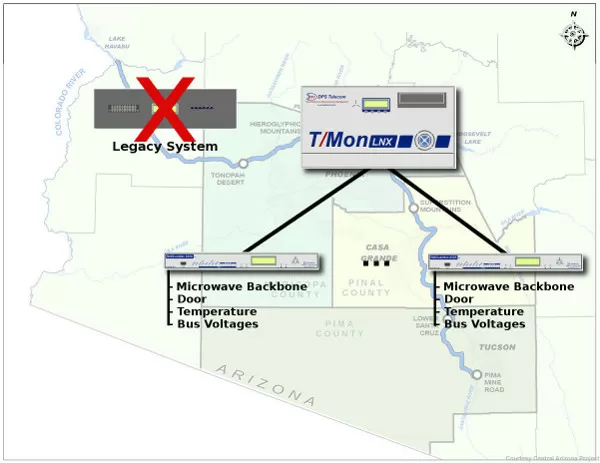
CAP had already purchased a T/Mon master station and NetGuardian RTUs, but the new equipment had not yet been fully integrated.
"It was sitting in a rack underutilized," Parsons says. "We were told 'You already spent the money, so you guys better get it working.'"
Parsons was tasked with configuring NetGuardians and wiring remote-site equipment into them. He began by working with decommissioned units: "I was the new guy," he recalls. "They handed me a couple of 832As that had been decommissioned and said, 'Why don't you see if you can get this working and get these deployed?'"
As CAP integrated more points, the project accelerated. "So I began doing that. As we began integrating things, we more or less figured out how to use the units. We went to DPS HQ for Factory Training shortly thereafter," Parsons remembers. "Eventually it began to take off. As it became more and more successful for us, it began to build momentum. Now it's the primary system."
With the new monitoring in place, CAP uses NetGuardian RTUs at most larger facilities and uses T/Mon as the master view of the system.
"We are primarily using the T/Mon now as our Master," Parsons says. "We have NetGuardians at most of our larger facilities. We monitor our microwave backbone. We monitor our facilities themselves, too, so we can monitor if the door is open or closed. We can look at temperatures in the facility. We can monitor the bus voltages."
CAP also values remote control for select points to reduce truck rolls and speed corrective actions. "We look at the ability to turn on and turn off the generators and a few other discrete points depending on the site," Parsons explains.
For utilities, this style of alarm monitoring is often most effective when it is practical and inclusive: if a device matters and there is no other reliable way to confirm its status, it should be alarmed. CAP follows that philosophy. "Primarily, if there's a piece of equipment where we don't have any other way to know what's going on, we'll hook it to the NetGuardians to be able to see what's going on," Parsons says.
CAP also benefitted from improved interfaces in the T/Mon environment. Interfaces are used daily and by multiple technicians, so clarity and speed matter.
"The changes that DPS has recently implemented seemed to fill in all the gaps," Parsons says. "It seems like those things are a lot better planned out, and they require a lot less effort on my part as an engineer to figure out how to use them."
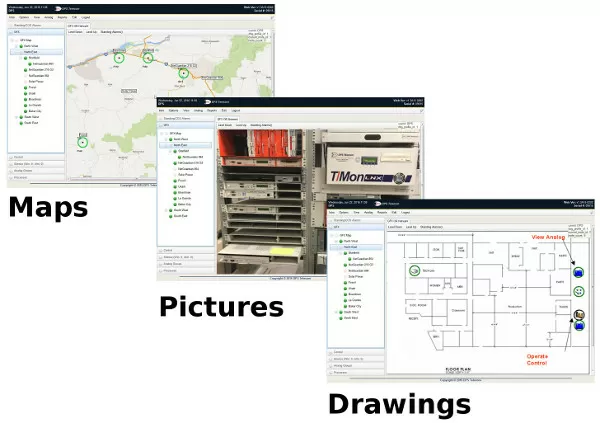
The Web GFX feature displays alarms as icons over maps, diagrams, rack elevations, or photographs. For teams that do not have deep familiarity with every site, graphical context can shorten time-to-troubleshoot.
"The graphics feature has a lot of potential to cut back on the required familiarity. A lot of our techs haven't been to all the sites. So, it's good to be able to use a photograph or rack elevation or illustrative diagram to point somebody to the failure," Parsons explains. "It goes beyond just 'There's a major failure, go there and figure it out.' I see that as useful to get people familiar with the sites and what's out there."
As CAP expanded the system, Parsons attended DPS Advanced Factory Training in California to stay current with newer functions and configuration methods, including SNMP.
"I received the Basic Factory Training a while ago, and it was sufficient to get me started with the units. I understood how they worked," he says. "But recent software updates have added more functionality and changed the way the units are used. And we recently decided to implement SNMP. I didn't have enough training to utilize that. I really desperately wanted to get that piece of it."
For water utilities and other critical infrastructure operators, SNMP support can be important for bringing IP network devices and managed equipment into the same alarm workflow. In many deployments, teams use NetGuardian RTUs for discrete and analog site conditions and also use SNMP polling or traps for managed devices, then unify everything inside T/Mon LNX for one-view awareness and consistent escalation.
CAPs monitoring approach is built around centralized visibility, early warning, and practical remote control. "You need one place that you can go to and see what's going on with your equipment," Parsons says. "You can see failures. You can see problems before they become failures."
CAP also emphasizes efficiency. Remote monitoring and control reduces the need to drive out to facilities to perform basic checks or changes. "The possibility of being able to make changes without having to go out and touch pieces of equipment directly adds value," says Parsons. "It cuts down on the number of man-hours it takes to maintain a system."
Looking forward, Parsons also identified additional monitoring opportunities, including more detailed oversight of battery plants. He notes that batteries degrade over time and that proactive monitoring plus periodic capacity testing improves confidence in backup power readiness.
Water delivery infrastructure spans many sites and long distances. Remote monitoring provides simultaneous awareness of network and facility conditions without staffing every location.
Common points include door status, intrusion contacts, high temperature, and critical power readings such as DC bus voltage. Sites may also add other discrete points as needed.
T/Mon LNX consolidates alarms from many RTUs into one view so operators can quickly see what changed, where it happened, and what actions may be required.
SNMP is often used to monitor IP-enabled devices on the network. Utilities may use SNMP alongside RTU discrete and analog points so both network and facility alarms appear in one monitoring workflow.
WebGFX can display alarms on top of maps, photos, and diagrams, helping technicians locate the affected equipment even if they are not familiar with a site.
If you are planning a cutover from a legacy monitoring system, DPS Telecom can help you define the alarm points that matter, design a practical architecture, and document the integration with application drawings.
Call us and talk with an expert about your requirements. We can provide a detailed quote with a custom application drawing and a benefits summary you can use to support your project budget.
Call 1-800-693-0351 for a quote
(or send us a quick online message)
Get a Free Consultation to discuss how T/Mon LNX and NetGuardian RTUs can improve alarm visibility and remote control across your own utility or industrial network. Or call DPS Telecom at 1-800-693-0351 to speak with an expert.


